
۲. Package Contents
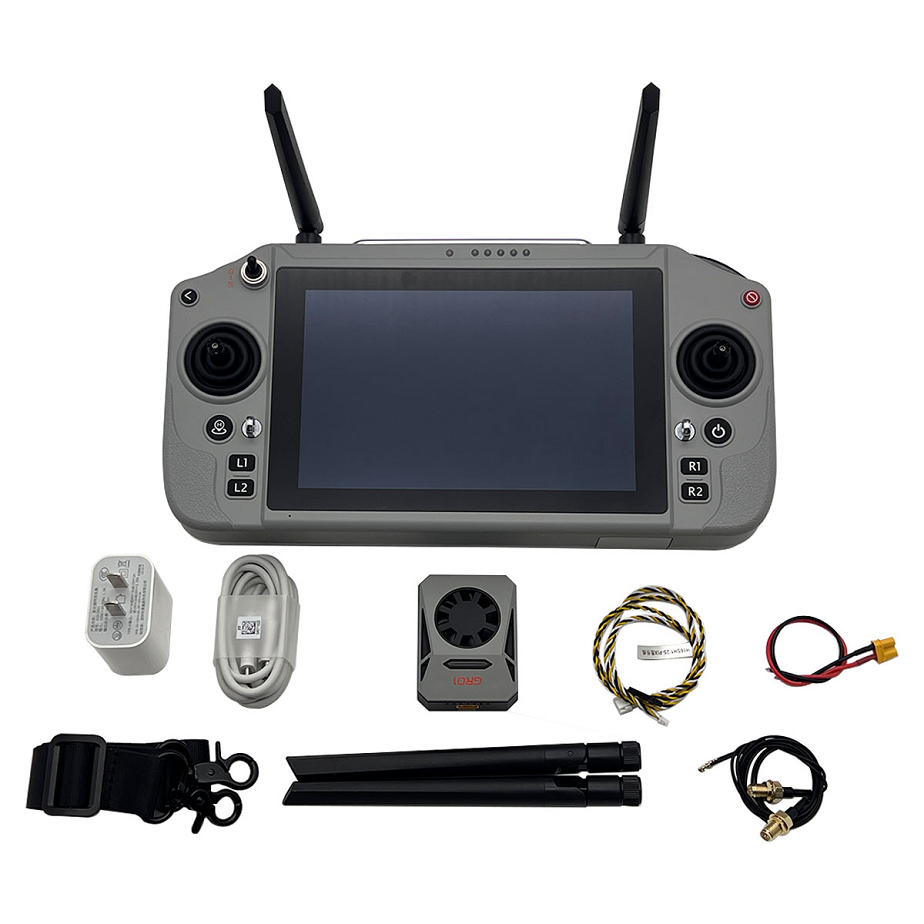
Upon unboxing, ensure all items are present:
- Skydroid G20 Remote Control
- GR01 Receiver (if included in your package)
- Charging Cable (Type-C)
- PIX Cable (for Pixhawk flight controllers)
- Antennas
- Power Adapter
- Other connection cables (as pictured)
- Carrying Case (if included)

۳. Setup Guide
۳.۱ Initial Charging
Before first use, fully charge the G20 remote control using the provided Type-C charging cable and power adapter. The device supports 36W PD fast charging.
۳.۲ Antenna Installation
Carefully screw the antennas onto the designated ports on the top of the remote control. Ensure they are securely fastened but do not overtighten.
۳.۳ SIM Card and External Connections
The G20 supports SIM card network ports for enhanced connectivity. Insert a compatible SIM card into the designated slot if network access is required for your operations. The device also features Type-C interfaces for various connections.

۳.۴ Connecting to a Drone (GR01 Receiver)
The GR01 receiver is equipped with serial ports, PWM (Pulse-Width Modulation), and SBUS interfaces. Use the appropriate cable (e.g., PIX cable for Pixhawk flight controllers) to connect the GR01 receiver to your drone’s flight controller. Refer to your drone’s flight controller manual for specific wiring diagrams and configuration.
۳.۵ Ground Station Software
The G20 runs on Android 13 and supports QGC Ground station software. Install and configure your preferred ground station application on the G20 for mission planning, telemetry, and control.
۴. Operating Instructions
۴.۱ Powering On/Off
- Power On: Press and hold the power button until the screen illuminates.
- Power Off: Press and hold the power button, then select ‘Power Off’ from the on-screen options.
۴.۲ Signal Transmission
The G20 utilizes dual-band 2.4GHz/5.8GHz frequencies with automatic switching to ensure stable signal and transmission efficiency. This helps improve anti-interference capabilities, especially in varied flight environments.

۴.۳ High-Definition Image Transmission
The G20 supports long-distance high-definition digital image transmission, providing a clear, real-time view from your drone. The 7-inch high-brightness display screen ensures visibility even in bright conditions.

۴.۴ Remote Control Range
The G20 is capable of achieving a 30KM image transmission and remote control distance, enabling extended operational ranges for your drone.

۵. Maintenance
۵.۱ Cleaning
Wipe the remote control’s surface with a soft, dry cloth. For stubborn dirt, use a slightly damp cloth and ensure no moisture enters ports or openings. Avoid harsh chemicals or abrasive materials.
۵.۲ Battery Care
The G20 has a battery life of 8 to 12 hours. To prolong battery life, avoid fully discharging the battery frequently. Store the device with a partial charge (around 50%) if not used for extended periods. Use only the provided or approved charging accessories.

۵.۳ Storage
Store the remote control in a cool, dry place, away from direct sunlight and extreme temperatures. Use the provided carrying case for protection during transport and storage.
۶. Troubleshooting
- Device not powering on: Ensure the battery is charged. Connect to the charger and try again. If the issue persists, contact support.
- No signal from drone: Check antenna connections on both the G20 and the GR01 receiver. Verify that the GR01 receiver is correctly powered and connected to the flight controller. Ensure the drone and remote control are within operational range.
- Poor image quality/lag: Check for environmental interference. Ensure antennas are properly oriented. Verify that the drone’s camera and video transmission system are functioning correctly.
- Ground station software issues: Ensure the Android 13 system is updated and the QGC Ground station application is the latest version. Restart the application or the G20 device.
- Connectivity problems (SIM/Type-C): Ensure SIM card is correctly inserted and active. Check Type-C cable connections for external devices.
۷. Specifications
G20 Remote Control Parameters
| Feature | Specification | Feature | Specification |
|---|---|---|---|
| Display | ۷ inch industrial touch screen + vision viewable screen | Resolution | ۱۹۲۰*۱۲۰۰ |
| Processor | Qualcomm 6nm processor | Computer Type | Android 13 |
| Size | ۲۷۷(L)*138(W)*96(H)mm | Weight | ۱.2kg |
| Battery | 20000mA/h | Endurance | ۶-8hours (Note: other sources indicate 8-12 hours) |
| Operating Memory | 8G | System Storage Memory | 128G |
| Operating Frequency Band | ۲.4G/5.8G | Channels Number | ۱۶ |
| Dynamic FM | Automatic frequency hopping | RF Power | 23dBm@CE/FCC |
| Remote Control Distance | ۵-30KM (ground-to-air, visual) | Operating Temperature | -۱۰℃~۵۵℃ |
| Charging Interface | TYPE-C | External Interface | USB port, SIM card slot, TYPE-C |
GR01 Receiver Parameters
| Feature | Specification | Feature | Specification |
|---|---|---|---|
| Frequency Band | ۲.4G/5.8G | Serial Baud Rate | ۵۷۶۰۰/۱۱۵۲۰۰/۹۲۱۶۰۰ |
| Supply Voltage | ۷.۲-72V (XT30) | Operating Current | 12V/300mA |
| Data Transmission Port | ۱ channel | Empty Port Rate | 200Kbps-160Mbps |
| Network Port | ۱ channel | Dimension | ۴۵.۵(L)*60(W)*21.5(H)mm |
| SBUS Output | ۱ channel | Weight | 37g |
| PWM Interface | ۳ channels | Operating Temperature | -۱۰℃~۶۰℃ |
| RF Power | 23dBm@CE/FCC | Channel Bandwidth | ۱.25MHz/2.5MHz/5MHz/10MHz/20MHz/40MHz |